Installation
Requirements
- Go v1.19 (https://go.dev/doc/install)
- GoCyclo (https://pkg.go.dev/github.com/fzipp/gocyclo) for Cyclomatic complexity metrics
- GoCognit (https://pkg.go.dev/github.com/uudashr/gocognit) for Cognitive complexity metrics
Installation Process
At the moment, installing Go-Architect can only be done manually, by executing the following commands:
git clone https://github.com/go-architect/go-architect
cd go-architect
make install
Troubleshooting
Wails is not installed correctly
If you receive a message similar to:
make: wails: No such file or directory
Then it's probably that your PATH environment variable doesn't correctly include your Go bin directory.
To fix this problem, check that you have the following variables set correctly:
  export GOPATH=<dir_to_your_go_directory> (Usually `~/go`)
  export GOBIN=$GOPATH/bin
  export GOSRC=$GOPATH/src
  export PATH=$PATH:$GOBIN
Using a module proxy
If you receive a message similar to:
Detected OS: Darwin
go install github.com/wailsapp/wails/v2/cmd/wails@latest
go: downloading github.com/microcosm-cc/bluemonday v1.0.17
(..........): read: connection reset by peer
make[1]: *** [wails-install] Error 1
make: *** [install] Error 2
Then, probably you're using a module proxy and your module proxy doesn't have wails or go-architect.
The workaround in this case is to reset the GOPROXY and GONOPROXY environment variables, install go-architect and finally
restore the environment variables original values, something like:
export GOPROXY=""
export GONOPROXY=""
make install
...(go-architect installation logs)
export GOPROXY=[ORIGINAL_GOPROXY_VALUE]
export GONOPROXY=[ORIGINAL_GONOPROXY_VALUE]
GO directory is not set
If Go-Architect cannot load the Go executable from your environment, then it will display the following message:
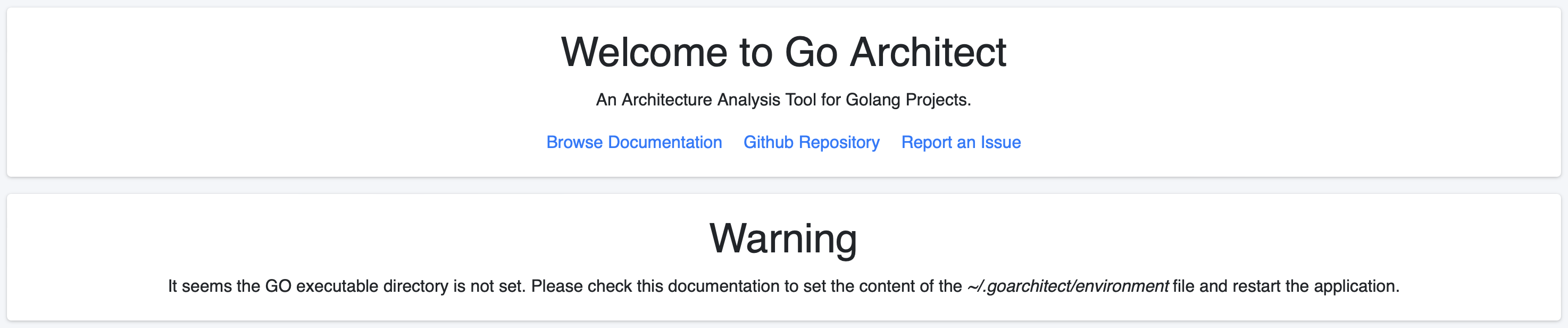
To fix this issue, you need to add the path to your Go binaries in the ~/.goarchitect/environment file.
- For example, is you use MacOS, and you've installed Go via Homebrew, then you should run:
echo $GOBIN:/opt/homebrew/bin > ~/.goarchitect/environment
Linux Dependencies
In order to install & run wails on Linux, you need to install some dependencies (reference).
Ubuntu
To install the dependencies on Ubuntu, you should run:
sudo apt-get install build-essential libgtk-3-dev libwebkit2gtk-4.0-dev